Talk to millions of customers, one at a time

Webroba sees what each customer does on your site and app, and sends the message that fits, when it fits. Someone who abandons a cart gets a text an hour later. If they buy first, they don’t.

A console in English, Persian and Arabic, with the Solar Hijri calendar. Your data on servers in Iran, or on yours.

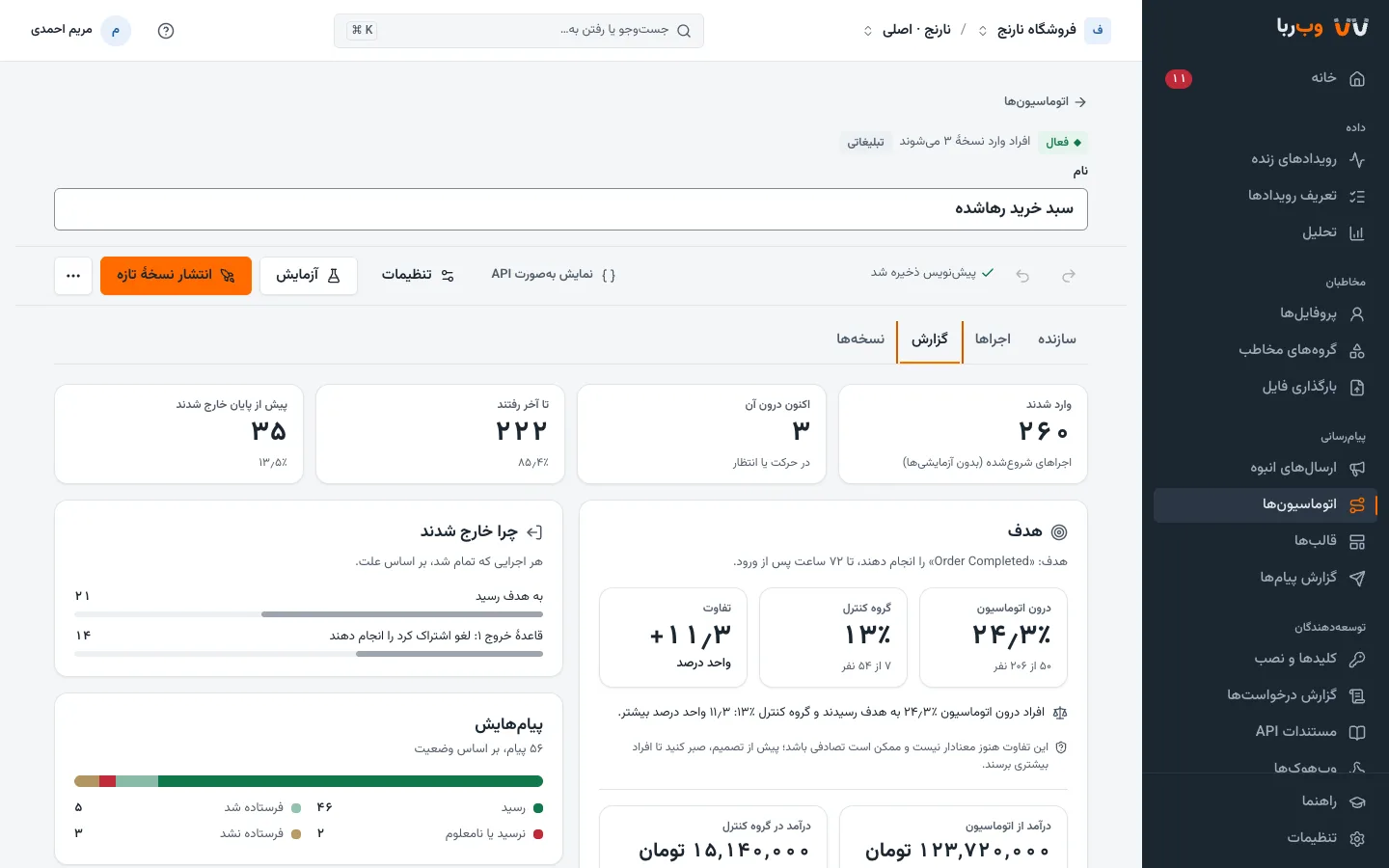
The journey builder in Webroba’s console: an abandoned-cart journey with the number of people at each step

Measured on Webroba’s production cluster in November 2026: three servers, each with 8 cores and 32 GB of memory.

events a second, sustained
12,200
events a second in a one-minute burst, every one accepted
30,000
typical time from an event arriving to a journey acting on it, under that load
0.5 s
events lost or duplicated while Postgres, Kafka and ClickHouse were each taken down under load
0

From the first visit to the next purchase

Events arrive from your site, apps and servers, and every person gets a profile. You decide who hears from you, when, and on which channel; the reports show what actually drove sales.

Journeys

A path each customer takes at their own pace

A journey starts when a customer does something, joins a segment, reaches a date such as their birthday, or when your system sends them in. Its steps wait, check conditions, send messages and ask your own systems.

  • Every order or ride gets its own run: placed, shipped, delivered, reviewed.
  • An HTTP request step fetches an order’s status or today’s price from your API, and the message and the path use the answer.
  • Before publishing, run the journey on yourself and get its messages on your own phone.
  • Sixteen ready templates, from abandoned carts to confirming cash-on-delivery orders.
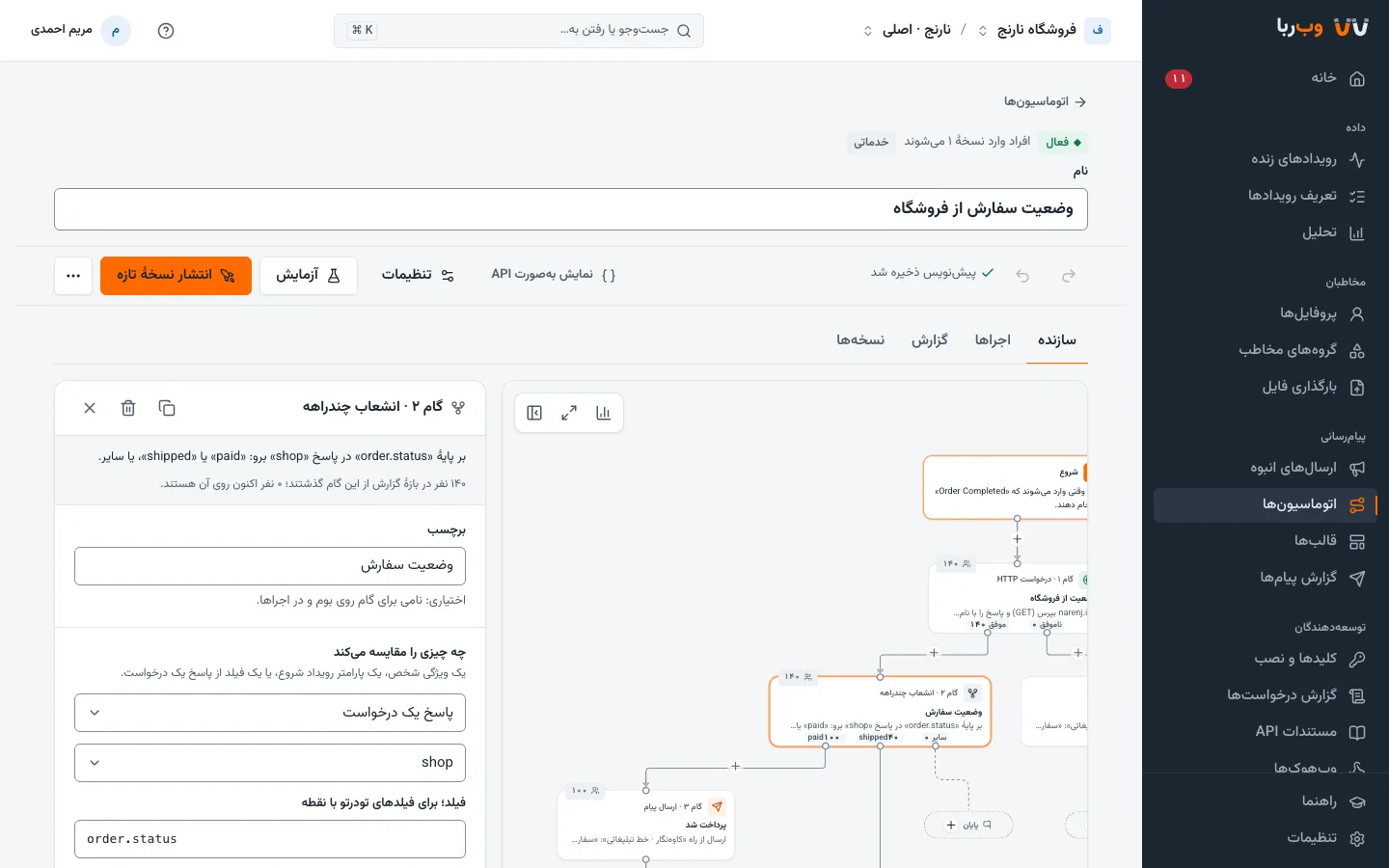
A multi-way branch in an order-status journey: each status in the shop’s answer takes its own path

Segments

Find people by what they do

Combine behaviour and traits: “bought at least twice in the last 90 days, lives in Tehran, and accepts marketing SMS.” The count, the channels that reach them and a sample of members update as you type.

  • Segments keep themselves current, and entering or leaving one can start a journey.
  • Arabic and Persian spellings match: علي and علی, أحمد and احمد, ۱۲ and 12 count as the same, however your data was typed.
  • One profile per person, from the first anonymous visit to after sign-in, on phone and laptop alike.
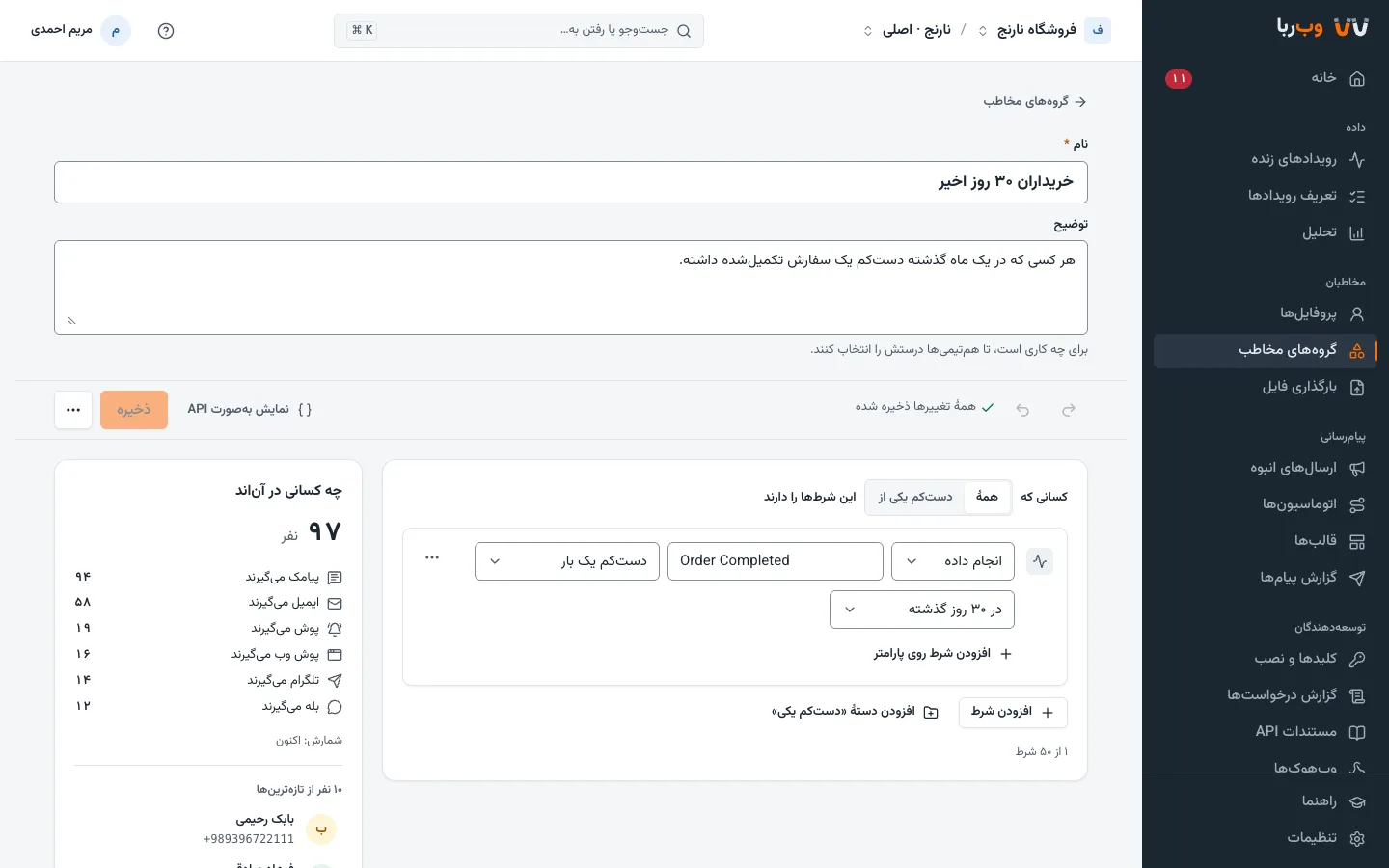
The segment builder with its live count and plain-language summary

Broadcasts

Test a few versions, then send the winner to everyone else

Try up to five versions of a message on part of a segment. Webroba sends the version that won with 95% confidence, on clicks or on your goal, to everyone else, and keeps the original when none clearly won.

  • Send at each person’s best hour, learned from when they are active.
  • Large broadcasts wait for an admin’s approval before they go.
  • Each address gets one message per broadcast, even if the send is run again.
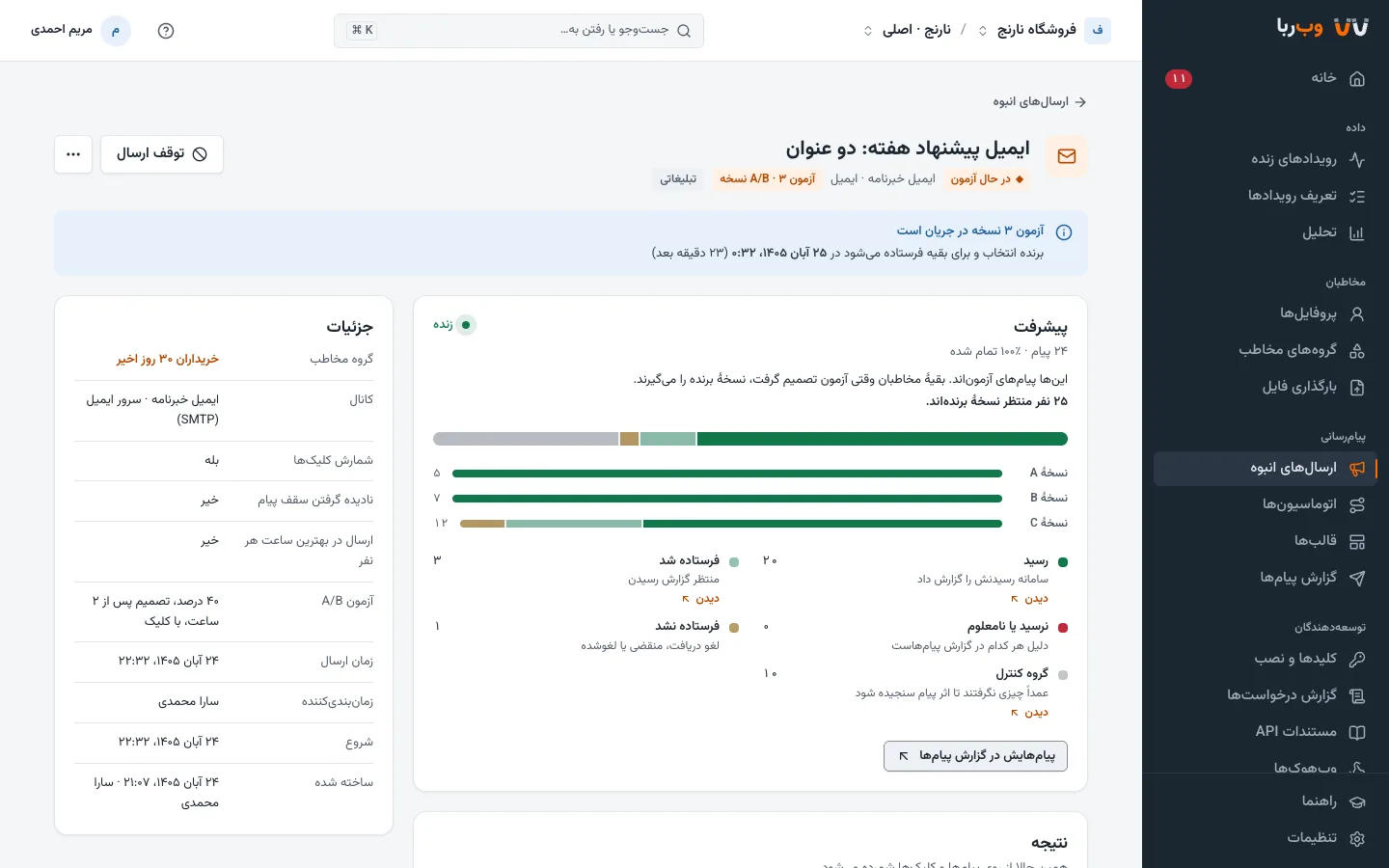
A broadcast during an A/B test of three subject lines

In-app messages

Inside your site and app, with nothing to design

A banner, a modal or a full screen, at the customer’s next visit or the moment they do something. Webroba’s SDK draws it in your brand colours, and the message stays in their inbox.

  • On your website and Android app, with no notification permission needed.
  • At most one popup per visit, so nobody gets buried in messages.
  • Shown, tapped or dismissed: all of it in the message log.
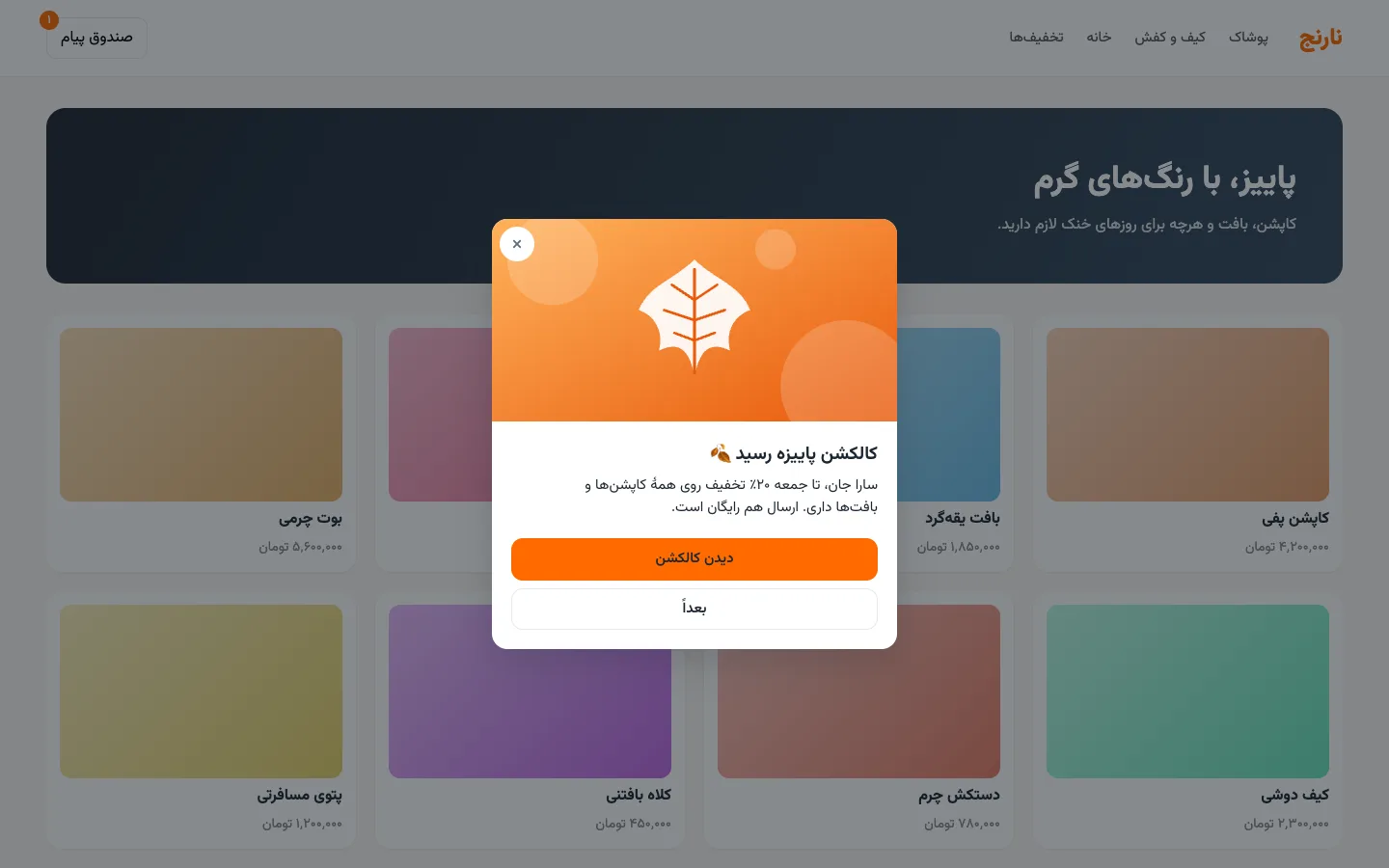
An in-app message on a shop’s website, with the inbox in the corner

Results

The sales your messages made, not the ones that would have happened anyway

Any journey or broadcast can hold back a control group that gets no messages. Reports put both groups’ conversions and revenue side by side and say whether the difference is significant yet.

  • Funnels, retention and trends for any event, with the people behind every number.
  • Dashboards emailed to your team every week.
  • Revenue per broadcast and journey, without one order counted for two campaigns.
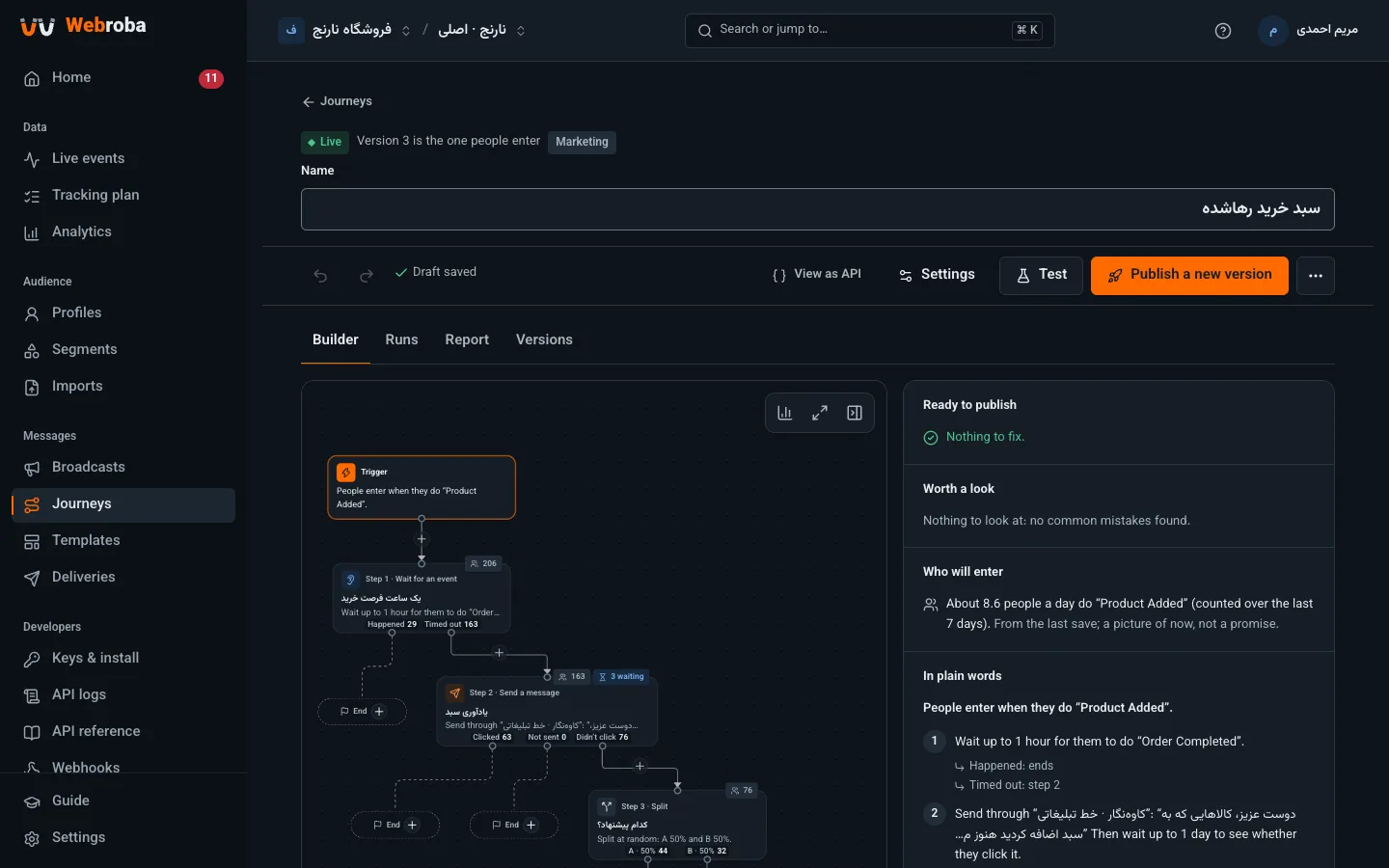
A journey report: goal conversion against the control group, and revenue

These screens show the console in Persian. It also runs in English and Arabic.

An abandoned cart, step by step

The first journey most shops build. Each customer goes through it on their own and leaves as soon as it is done with them: someone who bought gets no reminder.

  • Marketing respects quiet hours: a reminder that falls due at 2 a.m. goes out in the morning.
  • You decide how often someone may enter again, for example once a week at most.
  • A control group gets no messages, so the report can show what the reminders actually sold.
  1. Trigger Added a product to the cart The Product Added event from your site or app
  2. Wait for an event Up to an hour for a purchase If Order Completed arrives, the journey ends here.
    BoughtEnd: no message
  3. Didn’t buy
    Send a message SMS reminder From the marketing line, with a short tracked link to the cart
    ClickedEnd
  4. No click within a day
    Send a message Push with a discount code If the push isn’t shown, Bale; if that fails too, SMS
  5. Goal A purchase within 72 hours The revenue of each purchase is credited to this journey and compared with the control group.

The channels your customers actually open

Each channel connects with your own provider account, so your contracts, rates and SMS lines stay as they are. Before you connect one, a test channel answers like a real provider and sends nothing.

ChannelThroughNotes
SMSKavenegar, SMS.ir, Pishgam RayanDelivery reports, SMS part counting, a reminder to include opt-out text in marketing SMS
Mobile pushFirebase Cloud MessagingWith Webroba’s Android SDK you know whether each notification was shown, opened or blocked
Web pushStraight to browsersEven when your site is closed; in Chrome, Edge, Firefox and Safari
EmailYour own SMTP serverOne-click unsubscribe in mail apps
BaleBot, Business API, SafirSafir messages people by their mobile number
EitaaEitaayarPosts to your channel or group
TelegramBot, through a proxyMessage content goes to Telegram’s servers outside Iran
In-appWeb and Android SDKsBanner, modal, full screen and inbox
WebhookYour own systemA signed message reaches your server, to send any way you like

If a message doesn’t arrive, the next channel

  1. Push
  2. 5 minBale
  3. SMS

For a message to one person, list channels in order. If the push isn’t shown within five minutes, Bale goes; if that fails, SMS. You set the wait for each message.

Rules that keep customers from tuning out

  • Quiet hours: marketing waits from 22:00 to 09:00 in the recipient’s own time zone, then goes out gradually in the morning.
  • Frequency caps: by default at most 3 messages a day and 10 a week per person on each kind of channel.
  • Best hour: a marketing message can arrive at the hour that person is usually active.
  • Short links: links are shortened, tracked and tagged with UTM, so SMS gets shorter and clicks get counted.
  • Unsubscribes: someone who opted out gets no more marketing, even if their profile is deleted and created again.
  • Login codes and order updates always go at once: these rules apply to marketing only.

Built for the workload of a large organization

We took these numbers on the cluster set up for customers: three ordinary servers with 8 cores and 32 GB each. Add servers, and each part grows on its own.

Load and failure tests on the production cluster, November 2026
TestResult
Sustained load12,200 events a second; journeys acted within 0.3–0.5 s
One-minute burst from five places at once30,000 events a second; every one accepted and stored exactly once
Databases taken down under loadPostgres, Kafka and ClickHouse were each stopped mid-load; no event was lost or duplicated
SendingAbout 1,800 messages a second per channel; your provider’s own limit sets the real pace
Reports while taking 10,000 events a secondA segment counted over about 26 million events in 0.1–2.4 s
  • Each part scales on its own

    Intake, processing, journeys and sending each grow by adding copies, and one organization’s bad data doesn’t hold up anyone else.

  • Nothing disappears silently

    A 200 means the event is stored. An event sent twice with the same id counts once, and one that is refused shows up in the console with its reason.

  • Login codes never queue behind a campaign

    A broadcast to millions waits behind transactional messages, so login codes and order updates never wait for it.

Where your data goes

Your site, apps and servers
In Iran, or on your own servers
  1. Event intakeA 200 means stored
  2. Event queueRedpanda; every event on three servers
  3. Processing and profilesIdentity, tracking plan
  4. Journeys and sendingQuiet hours, caps, fallback
  • PostgresPrimary and replica, on two servers
  • ClickHouseEvents, segments and analytics
  • Nightly backupsOn separate storage
Message providersSMS, email, Bale, Firebase…
Only calls to providers outside Iran, such as Firebase for Android push, or Telegram if you connect it, leave the country.

Move to Webroba in weeks, not months

Most of a migration is bringing your data over and connecting your systems. Webroba is built for both with real Iranian data: Persian Excel files, Solar Hijri dates, and phone numbers everyone writes differently.

  1. Bring your existing data

    Upload customers with their traits, past orders as events, and lists: up to 2 GB and 50 million rows per file, gzipped .csv.gz too. You see a review before anything is written, and download problem rows with their reasons to fix. Uploading the same file again never creates anyone twice.

  2. Connect live events

    Event intake is compatible with Segment’s API: if you use Segment’s libraries, only the URL and key change. One snippet for your site, an SDK for Android, and libraries for Go, TypeScript, Python and PHP on your servers.

  3. Connect your channels

    Add your Kavenegar, SMS.ir, Firebase or mail server account in channel settings. Until then, build and test everything on a test channel.

  4. Build and test your journeys

    Start from templates, run them on yourself, and publish with a control group. A test workspace is separate from production, and its data and messages never mix with it.

In the demo, we go through a migration plan for your own data and systems.

Security that starts in the database

Isolation and encryption are enforced in the database and the infrastructure, not only in application code.

  • Isolation in the database

    Each organization’s and workspace’s data is kept apart by row-level security in Postgres and its own user in ClickHouse, not just by a condition in code.

  • An encryption key per workspace

    Provider credentials and secrets are encrypted with their own workspace’s key and never written to any log.

  • Roles, with personal data masked

    Owner, admin, editor and viewer. Viewers see phone numbers and emails partly masked, and no message content.

  • Single sign-on and two-step verification

    Any OpenID Connect provider, such as Keycloak or Azure AD. Each email domain is enabled only after Webroba’s team approves it.

  • Audit log

    Every settings change is recorded with when, who and what: a new channel, a revoked key, a changed role.

  • Deleting a person, completely

    Gone from live data within hours and from backups within 30 days. If the service is ever restored from a backup, the deletions made after it run again.

  • Read-only support access

    Webroba’s team looks only with a stated reason, for four hours at most, unable to change anything, and your owners see who, why and until when.

  • Addresses only from trusted sources

    Phone numbers and emails are accepted only from your server or a signed user, so nobody can pull someone else’s messages to their own phone from a browser.

  • Backups

    Nightly backups of every database to separate storage, and a restore drilled before every release.

For businesses whose customers come back every day

The ready templates were built for these three, and each adapts to your own events and channels.

E-commerce and marketplaces

  • Abandoned cart: a reminder an hour later, and a discount the next day only for those who still haven’t bought.
  • Cash-on-delivery orders confirmed with one link before the courier sets out.
  • Twenty-five days after a purchase, a nudge to reorder for those who haven’t come back.
  • A seasonal sale with a fixed start and end, and an evening reminder for those who didn’t click.

Delivery, ride-hailing and travel

  • Each ride or order has its own run: accepted, on its way, arrived.
  • Login codes by push first, and by SMS if the push isn’t shown.
  • Asks your API for the status and builds the message from its answer.
  • One feedback request after each delivery.

Media, content and education

  • Welcome and step-by-step onboarding, with the next message only for those who skipped the last step.
  • Class reminders a day and an hour before, with the link to join.
  • Renewal reminders a week and a day ahead; renewing ends them.
  • Newsletters at the hour each reader is most active.

Everything the console does, the API does too

The console itself runs on the public API. The API reference lives in the console, with its examples filled in with your workspace’s keys and ids.

  • Event intake compatible with Segment: /v1/track, /v1/identify, /v1/batch and the rest.
  • A web SDK under 5 KB gzipped, and an Android SDK; client libraries for Go, TypeScript, Python and PHP.
  • An OpenAPI spec. Every write takes an Idempotency-Key, so a retry never does anything twice.
  • Signed webhooks with retries, a delivery log and replays.
  • Transactional messages in one request: login codes, order updates, receipts.
Sending an event from your server
curl -u 'hsk_…:' https://ingest.webroba.ir/v1/track \
  -H 'Content-Type: application/json' -d '{
  "userId": "customer-42",
  "event": "Order Completed",
  "messageId": "order-O-1042",
  "properties": { "orderId": "O-1042", "total": 1250000 }
}'

The same request you would send to Segment; only the URL and the key differ.

Cloud in Iran, or on your own servers

Both are the same software with the same features. The difference is where the data lives and who runs the servers.

Webroba cloud compared with a dedicated install
AspectWebroba cloudDedicated install
Where data livesWebroba’s servers in Iran, with backups in IranYour own servers, in the data center you choose
Who runs itWebroba’s teamYour IT team, or Webroba’s team remotely, depending on the contract
SetupWebroba’s team creates your organization and invites its ownerKubernetes with Helm, or Docker Compose on one server, with runbooks for install, upgrade, backup and restore
FeaturesAll of themAll of them: the same software and releases
InternetHandled by WebrobaOutbound access is needed to reach message providers; it works through your corporate proxy
Best forStarting fast, with no infrastructure to runContracts that keep data inside the organization

Frequently asked questions

How long does it take to get going?

The site snippet takes minutes, and events show up in Live events right away. With a test channel and the templates, you can build your first journey the same day. What usually takes longest is bringing existing data over and deciding which events to send.

We use Segment. Do we have to change our code?

No. Webroba’s event intake is compatible with Segment’s; change the URL and the key in Segment’s libraries.

We have an iOS or Flutter app.

Native iOS and Flutter SDKs aren’t available yet. Until they are, Segment’s official libraries send events to Webroba and push goes through Firebase. In-app messages aren’t available in those apps yet.

Who pays for SMS?

You do, directly to your provider: channels connect with your own accounts. If credit runs out, Webroba pauses the channel and tells you, rather than failing messages one by one.

How is pricing set?

Plans differ only in volume: monthly active customers, events and messages. Every plan has every feature; single sign-on, an SLA and a dedicated install are priced separately. We quote after the demo, based on your volume.

Can a customer get the same message twice?

Webroba guards against it several ways: each address gets one message per broadcast, a repeated request from your server with the same key sends nothing, and a message whose provider gave no clear answer is never retried automatically. One missing message is better than two identical ones.

What if we go over our contracted volume?

Events and profiles are always accepted, so no data is lost. Past your monthly message limit, marketing waits while transactional messages still go.

Can we take our data out?

Read profiles, segment members, messages and reports through the API, and receive message events by webhook as they happen. Automatic export to your own storage isn’t available yet.

Which languages does the console speak?

English, Persian and Arabic, in light and dark themes. Each member picks their own, and messages can be in any language.

See Webroba on your own use case

Fill in the form and we’ll get in touch to set up a session.

In the demo

  • We walk through the journeys that matter to your business, in the console.
  • We go over bringing your data across and connecting your channels.
  • We weigh cloud against a dedicated install for what your contract needs.

Mobile or landline. Outside Iran, include the country code.

We use these details only to arrange the demo and talk with you about Webroba.